
Free business template · Updated October 23, 2026
Free Packing Slip Template for Excel + Partial-Shipment Example
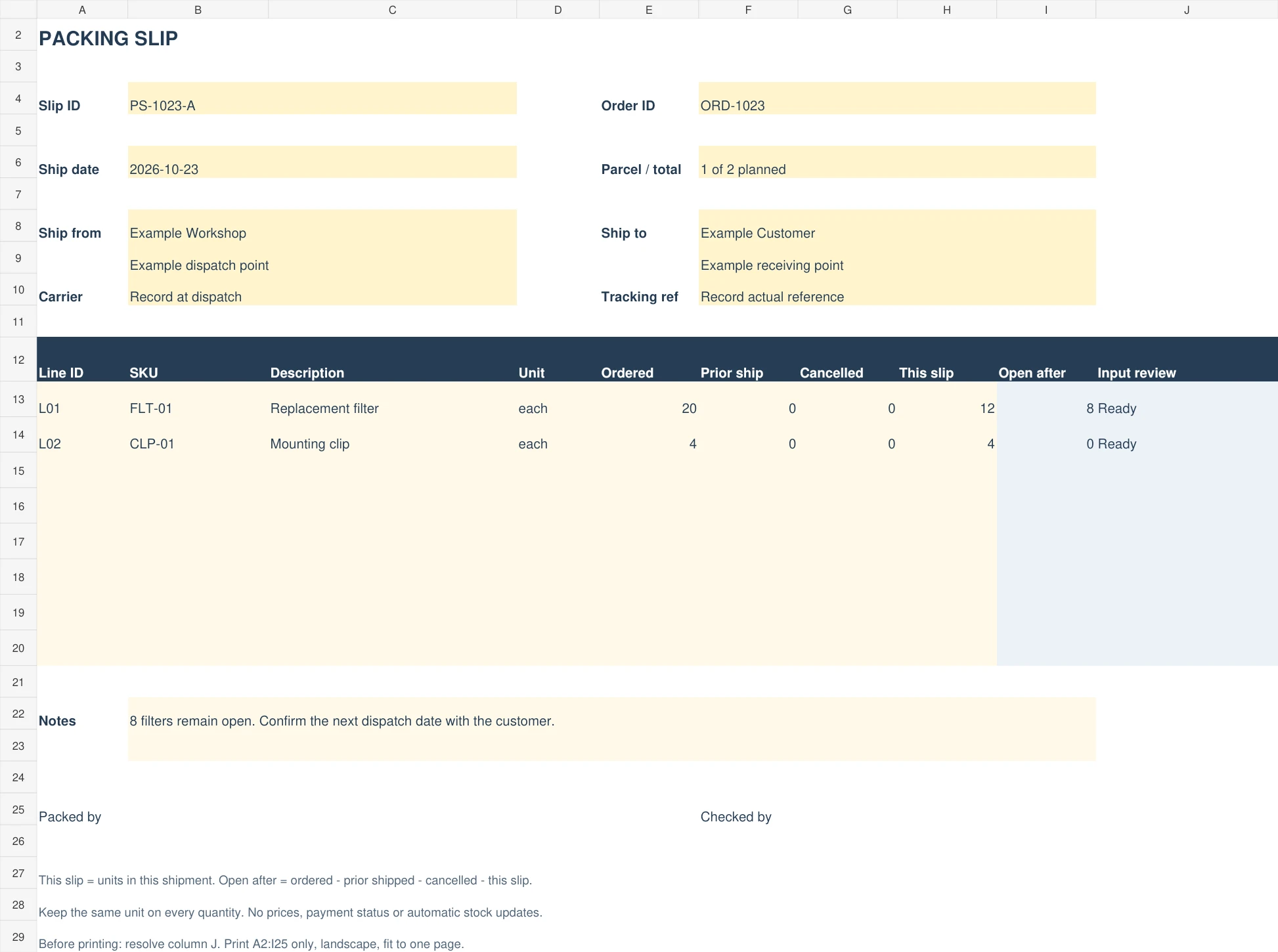
A packing slip lists the goods in one shipment and connects them to the customer's order. Download a blank Excel form with remaining-quantity formulas or a printable PDF. The fictional example shows 12 of 20 filters shipped now, with eight still open.
Download Excel template (.xlsx)Download printable PDF
Excel: blank slip, filled example and instructions. PDF: blank form and filled example, two US Letter landscape pages. No signup, macros or external connection.
What is in the free download?
The Excel workbook has eight line rows on each slip tab. Blank slip starts without order data; Filled example shows filters and mounting clips for a fictional order. Instructions explains the inputs, formula checks and print selection. The PDF is a static writing form and completed example; it does not calculate.
| Field | Purpose |
|---|---|
| Slip ID and order ID | Give this dispatch a unique reference while preserving the customer's original order number. |
| Date, parcel, carrier and tracking | Record the fixed dispatch details. Enter an actual carrier reference when available; the file creates no label. |
| Ship from and ship to | Enter the actual business and receiving details. The fictional preview uses placeholders, not real customer data. |
| Line ID, SKU, description and unit | Identify each variant and keep each, pack, weight or length consistent across quantity columns. |
| Ordered / prior shipped / cancelled | Original order quantity, cumulative prior dispatches and cumulative agreed cancellations for that line. |
| This slip / open after | Units in this shipment and the calculated remaining unfulfilled quantity. |
How to fill out the packing slip
- Save your own copy. Keep the clean template and give the working file a recognizable order-and-slip filename.
- Enter references and addresses. Preserve the order ID, choose a unique slip ID and use the actual receiving location.
- List the parcel contents. One row identifies one order line or separately traceable item. Enter all four quantity inputs, including zeroes where none apply.
- Review the open quantity. Resolve Complete row or Check quantities in column J. Keep calculated columns I:J intact.
- Check the actual parcel. Match SKU, variant, unit and count to the order. Record the packer and checker under your own process.
- Archive and update records. Keep each issued slip; enter actual dispatch once in your order and stock records. Printing does not dispatch goods.
Filled example: ship 12 filters and keep eight open
Example Workshop has customer order ORD-1023 for 20 replacement filters and four mounting clips. Slip PS-1023-A sends twelve filters and all four clips. The filter balance remains eight; the clip balance is zero. Do not total different items to decide whether a specific line is complete.
| Slip or event | Ordered | Prior shipped | Cancelled | This shipment | Open after |
|---|---|---|---|---|---|
| First dispatch | 20 | 0 | 0 | 12 | 8 |
| Second dispatch, no cancellation | 20 | 12 | 0 | 8 | 0 |
| Alternative second dispatch: three agreed cancelled | 20 | 12 | 3 | 5 | 0 |
The last row is an alternative to the second row, not a third shipment. The formula is open after = ordered − prior shipped − cancelled − this shipment. Ordered stays twenty. Changing it to twelve after the first dispatch hides the remaining commitment.
For shipment two, make a new slip and retain the first. Enter twelve in prior shipped, rather than replacing the original slip with a cumulative twenty-unit parcel. In the customer order tracker, shipped units are cumulative: update twelve to twenty for the no-cancellation case, or to seventeen with three cancelled. The two files do not synchronize.
What the quantity warnings mean
An unused row stays blank. A started row needs line ID, SKU, description, unit and four numeric quantities. Ordered must be positive; prior shipped, cancelled and this shipment must be nonnegative. Their sum cannot exceed ordered. For example, 20 ordered, 12 prior and 9 now is invalid; the workbook leaves open after blank and asks you to check quantities.
Decimal quantities are allowed for a unit such as meters, but whole physical items should use whole counts. A blank input is not an intentional zero. The form does not check duplicate IDs, address accuracy, stock availability or whether a cancellation was approved. Review those against your source order before issue.
Packing slip, purchase order or invoice?
| Document | Main question | Use here |
|---|---|---|
| Packing slip | What is in this shipment? | This template, one dispatch at a time. |
| Customer order tracker | What was requested, paid, cancelled and fulfilled? | Free Excel or CSV order tracker. |
| Supplier purchase order | What is the business ordering from a supplier? | Purchase order form; use the PO tracker for receipts. |
| Invoice | What payment is being requested? | Keep the original invoice and a separate collection schedule where useful. |
This slip omits prices and payment status. It does not replace an invoice, carrier label, delivery signature or customs documentation. It does not calculate taxes, process refunds, send messages or update an inventory system.
For stock handling, follow the sales and inventory event example. If twelve units are still on the packing bench at a stock count, use the count cutoff and movement log so reserved stock is not mistaken for missing stock.
Save, print and check the working copy
Keep the workbook in .xlsx format to preserve formulas and formatting. On the required slip tab, select A2:I25, choose Print Selection, landscape orientation and fit to one page. Column J contains internal input reviews and stays outside the recipient-facing selection. Preview the output before sending; application and printer settings can change layout.
The PDF is already two US Letter landscape pages: print page one for the blank form or page two to read the fictional example. It is not a fillable PDF. For A4 paper or a phone spreadsheet app, check the print preview and adjust the paper size before printing. After importing the workbook into another spreadsheet app, test 20 ordered and 12 now, confirm eight open, save and reopen the same copy before using real orders.
For longer descriptions or more than eight lines, use clearly linked continuation slips and review the complete shipment manually. This file does not automatically create extra pages. Back up issued copies separately from the editable master.
Frequently asked questions
Is the packing slip template free?
Yes. The Excel workbook and PDF are direct downloads without an email signup or purchase. The site's paid planners are separate products.
Can I use it in Google Sheets or Word?
The offered editable file is Excel .xlsx. You can try importing a copy into another spreadsheet app and verify its calculations and layout. No native Google Sheets copy button or Word version is provided.
Does a return increase the open shipment quantity?
Not automatically. This form records ordered, dispatched and cancelled quantities. Record returned goods, condition, refunds and any replacement commitment separately under the original order; do not subtract returns from historical dispatches to disguise the event.
Does an open quantity of zero prove delivery?
No. It means the entered quantities account for the modeled commitment. Keep carrier and delivery evidence separately and review any dispute using the original records.
OPTIONAL NEXT STEP
When one free worksheet is not enough
The free packing slip documents what was prepared or shipped for a specific order; it is not proof of delivery or payment. Compare the Sales Management System if you need to manage more sales and stock records. Preserve carrier confirmations and order references separately. The free template stays available without a purchase; its files and backups do not automatically import into the paid product.