
FREE DOWNLOAD · NO EMAIL REQUIRED
Free Purchase Order Template for Excel + Filled Example
Create a supplier purchase order with a unique PO number, buyer and supplier details, requested delivery, line items and a total. Download the original workbook for editable calculations or the PDF for a handwritten order.
Download Excel template (.xlsx)Download printable PDF
Published October 22, 2026 · Excel: blank form, filled example and instructions · PDF: blank form and filled example, US Letter landscape
What is included in the free template?
- Blank PO: ten editable line-item rows with calculated line amounts and total.
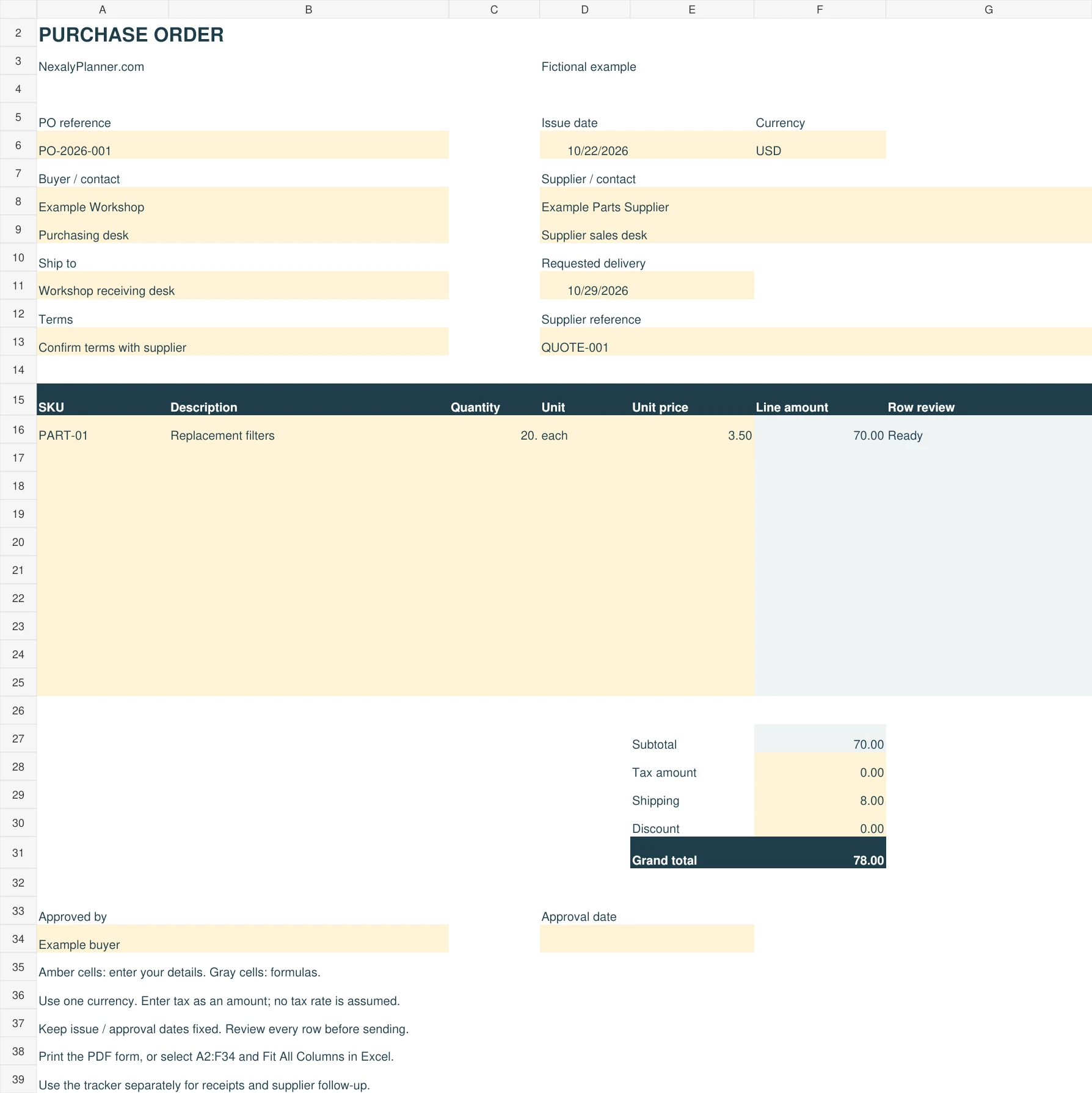
- Filled example: 20 filters at $3.50 each, plus $8 shipping, for a $78 order.
- Instructions: input colors, review checks, saving and print selection.
- Printable PDF: a six-line blank form and a separate completed example.
The Excel file uses familiar formulas and contains no macros. There is no native Google Sheets copy or Word version offered on this page. Keep the .xlsx original if converting it into another app and check the formulas after conversion.
How to fill out a purchase order in five steps
- Save a working copy. Give it a unique PO reference and enter a fixed issue date. Do not use a changing TODAY formula for an archived order.
- Identify both parties. Fill buyer, supplier, contact, ship-to address, requested delivery date and one currency.
- Add items. Enter SKU where relevant, description, positive quantity, unit and a nonnegative unit price. Keep the gray formula cells intact.
- Review costs. Enter tax, shipping and discount as nonnegative amounts in that currency. Fix incomplete or invalid rows before relying on the total.
- Approve and keep a copy. Record the approver and date under your own process, confirm supplier terms, then save the issued version. Use a separate tracker for receipts.
Purchase order fields explained
| Field | What to enter |
|---|---|
| PO reference and dates | A unique order number, fixed issue date and requested delivery date. |
| Buyer, supplier and ship to | Business identities, useful contacts and the actual receiving location. |
| Quantity, unit and price | For example, 20 each at 3.50. Check whether a quoted price is per item, pack or case. |
| Tax, shipping and discount | Actual amounts for this order. Tax is entered manually, not calculated from a jurisdiction. |
| Approval and terms | The approval record and terms you have confirmed with the supplier. |
A filled $78 purchase order example
Example Workshop orders 20 replacement filters at $3.50 each. The line amount is 20 × $3.50 = $70. Add $8 shipping, $0 tax and $0 discount: the grand total is $78. Zero tax is a fictional input, not a rule for US purchases.
Blank item rows stay blank. A partly completed row asks you to complete it. Invalid quantity or price blocks that row; incomplete rows and invalid adjustments prevent the grand total from appearing as a finished amount.
Purchase order form, tracker or invoice?
This form records one order to a supplier. The purchase order tracker follows multiple orders, expected dates and receipts. An invoice records the supplier's request for payment. Keep the PO reference in related records so you can match the order, receipt and invoice.
Before issuing an order, use the supplier quote comparison to check pack quantities, freight and lead times. For a larger inventory workflow, see the optional Inventory & Procurement Planner.
Save and print
Save the workbook with a unique filename before editing, and keep a copy of each issued order. The PDF is ready for US Letter landscape. For Excel printing, select A2:F34 on the required PO tab, choose Print Selection and fit to one landscape page. Column G contains your review checks and stays outside the supplier-facing print selection. A4 and native Excel mobile printing have not been certified.
Frequently asked questions
Is this purchase order template free?
Yes. Both downloads work without an email signup or purchase.
Does it calculate tax or send an order?
Enter the actual tax amount yourself. The files do not email suppliers, take payments, update stock or determine the legal effect of an order.
Can I add more than ten Excel line items?
This version has ten rows. Splitting a large order across additional copies needs clear references and a manual total review. Do not insert rows without checking every affected formula.