
FREE RESOURCE · EXCEL + PDF + BROWSER WORKSHEET
Free Purchase Requisition Template: Excel + PDF
Request an internal purchase before anyone places an order with a supplier. Record what is needed, estimated costs, budget context and a separate manual approval decision.
Download Excel (.xlsx)Download printable PDFUse editable worksheet
Published October 24, 2026 · By NexalyPlanner Editorial · No signup required
What is included?
- Excel: Blank, Filled example and Instructions tabs; ten item rows with editable inputs and calculated amounts.
- Printable PDF: two US Letter landscape pages, one blank and one filled fictional example. It is a static form for handwriting, not an interactive PDF.
- Browser worksheet: ten editable rows, local save/restore, JSON backup, CSV report and browser print.
The .xlsx has no macros. There is no native Google Sheets copy or Word file. Browser JSON backups restore into this browser worksheet, not the workbook or a paid app. CSV preserves a report, not an editable backup with formulas.
Use the editable purchase requisition
Start blank or load the labelled fictional example. Entries stay in this page unless you save or export them. Device storage belongs to this browser; keep a JSON backup for another device. Scroll the item table horizontally on a small screen.
| Item / SKU | Description | Unit | Quantity | Est. unit cost | Line estimate | Suggested supplier | Quote ref |
|---|---|---|---|---|---|---|---|
Typed review status is a manual record. It does not verify identity, approve spending, send an order or move money.
How to use the purchase requisition
- Describe the need. Enter a unique request reference, requester, department, need-by date and business reason. A request should explain the work that will be delayed if the items are unavailable.
- List items in buying units. Use quantity and estimated price for the same unit. Twenty each at $6 is different from twenty boxes at $6. Add a suggested supplier and quote reference when known.
- Add estimated charges. Enter shipping and tax as amounts in the selected currency. These are estimates you supply; the form does not look up supplier prices or tax rates.
- Compare with the available budget. Enter the budget available for this request. Negative headroom calls for a revised request or a budget decision. Positive headroom is only a cost comparison.
- Record the separate approval. The reviewer enters a decision and fixed review date under your process. If the request proceeds, create the supplier PO separately and add its reference. Retain both versions.
Worked example: check the result
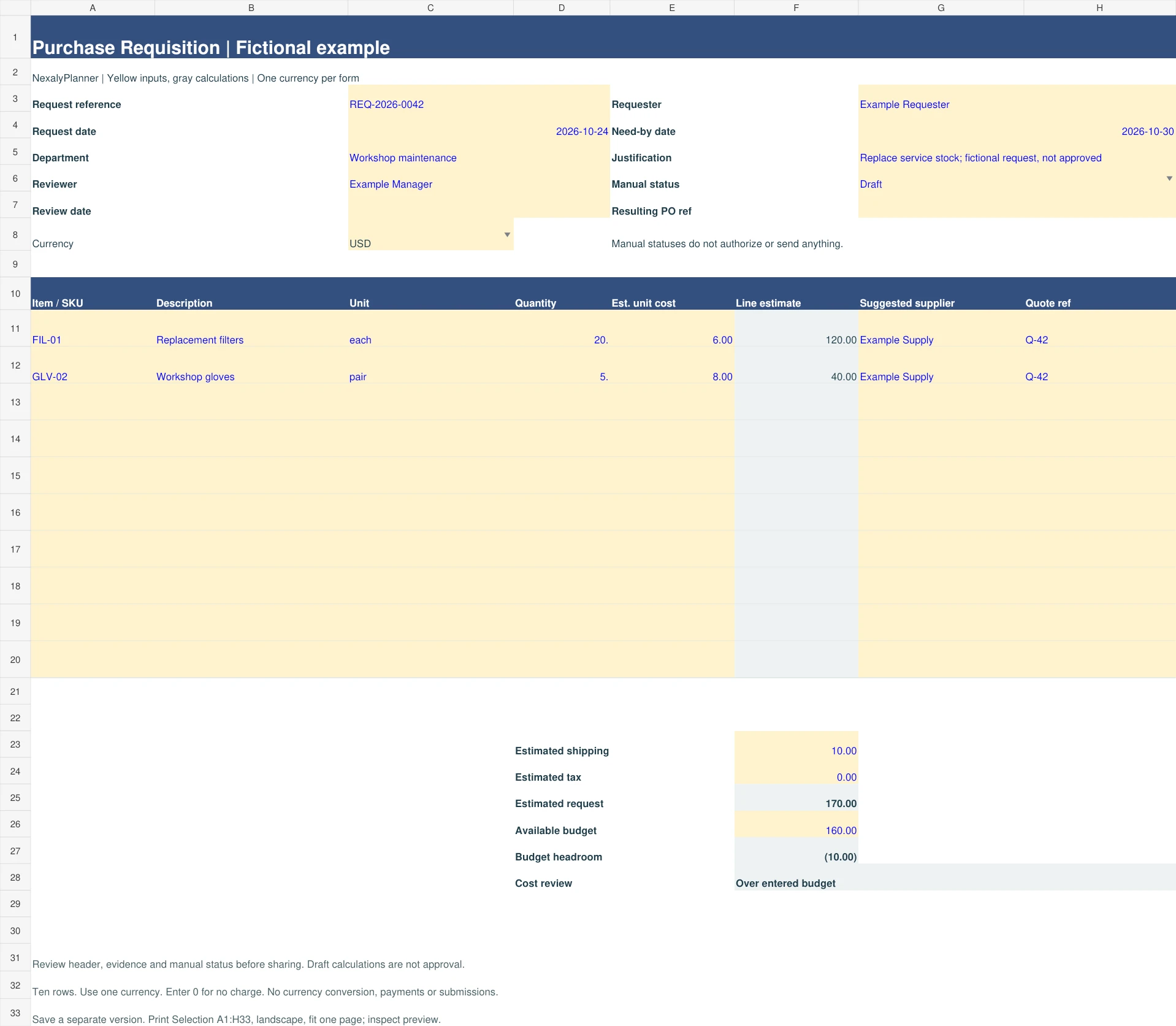
Request 20 filters at $6 each and 5 pairs of gloves at $8, plus $10 shipping and $0 entered tax. The estimate is $120 + $40 + $10 = $170. Against an entered $160 budget, headroom is -$10. Reducing filters to 18 changes the estimate to $158 and headroom to $2; neither result approves the purchase.
Load the fictional example above to inspect the calculation. The Excel Filled example tab and the second PDF page use the same inputs. A blank form stays incomplete until the required rows and adjustment amounts are supplied. Enter 0 for a charge that does not apply.
Requisition, purchase order and invoice
The requisition records an internal need. A purchase order records the order issued to a supplier. An invoice is a request for payment. Keep separate references so an internal estimate does not become an unintended supplier order.
Keep budget fit separate from approval
The example is $10 over the entered budget. Changing the quantity to 18 leaves $2 headroom, while the manual status remains Draft. The worksheet does not check spending authority, existing commitments or departmental policy.
What to do when a quote changes
Update the estimated price and quote reference before review, then save a version. If a supplier order already exists, handle the change through that purchasing process rather than replacing the historical request.
Save, reopen and print
In the browser, choose Save on this device deliberately; entries are not saved automatically. Restore device copy retrieves that browser’s last saved version. Clearing browser storage or using a private window can remove it. Download JSON backup before switching devices or closing an important session, and store files containing customer or employee details appropriately.
For Excel, save a separate .xlsx per request. Reopen it and change one value to check recalculation before using it operationally. Select A1:H33 on the required tab, use landscape Print Selection and fit to one page. Column J contains row review messages outside that print area; fix them first. Ten rows are provided: do not extend the form without checking formulas and total ranges.
The downloadable PDF has a fixed layout. Browser Print / Save PDF uses your browser’s print dialog and may span more than one page; check every row and field in preview. The workbook has been recalculated and export/import tested with Artifact Tool. Native Excel, Google Sheets, physical printer output and real-phone behavior have not been certified.
Related workflow
- Continue with the supplier purchase-order form.
- Continue with the purchase-order tracker.
- Continue with the supplier quote comparison.
For a broader optional workflow, read about the Inventory & Procurement Planner. This free form works independently; its backup files do not import into the paid product.
Frequently asked questions
Is this an employee hiring requisition?
No. This resource requests goods or services for an internal purchase. It does not manage recruitment or employee headcount.
Does an Approved status issue a purchase order?
No. Status is a manual record only. The worksheet neither verifies the approver nor sends an order. Prepare and review a separate PO.
Can I use it for services?
Yes, when quantity and unit describe the service clearly, such as 2 hours at a quoted hourly amount. Keep the agreed scope and quote reference with the request.
Background reading: Oracle purchase-order creation documentation. The original NexalyPlanner worksheet and fictional example do not reproduce a third-party template. Source guidance does not certify this form.
OPTIONAL NEXT STEP
When one free worksheet is not enough
This free requisition form documents one internal request before approval. Explore the paid planner when you need a broader supplier, purchasing and inventory workflow. An internal requisition is not a supplier purchase order, and data from this template will not import automatically. The free template stays available without a purchase; its files and backups do not automatically import into the paid product.